DeepSeek Harness Connector
Unofficial community project by Corsen AI. Not affiliated with, endorsed by, or certified by DeepSeek.
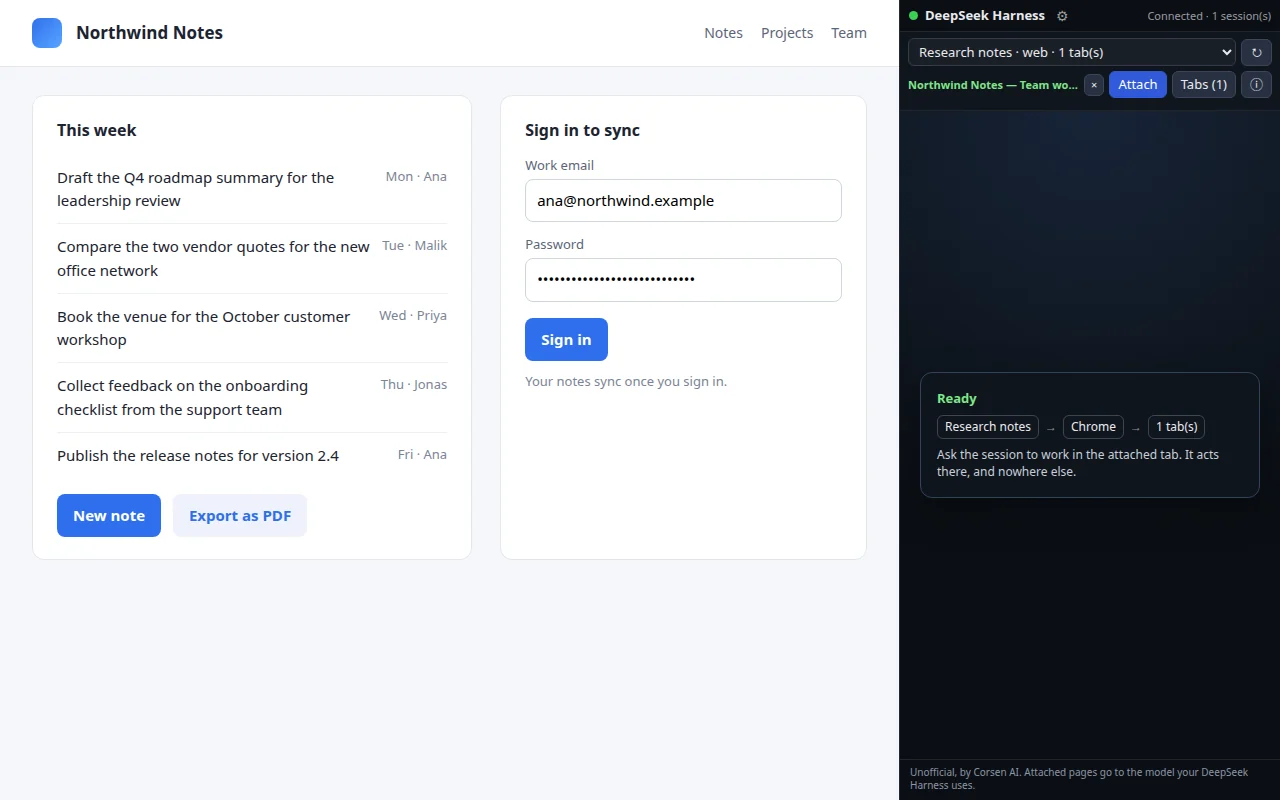
DeepSeek Harness Connector lets one exact DeepSeek Harness session, running on your own computer, read and act in the browser tabs you explicitly attach to it, inside the Chrome profile you are already signed in to. No hidden automation browser, no guessing which tab belongs to which task.
Free · Version 0.1.0 · Updated 7 Nov 2026 · Chrome 120+ · English and French
Before you install
What you need, then 4 steps.
- DeepSeek Harness (dsh) installed on your computer.
- Node.js 22.19 or later in the 22 line, or Node.js 24 and later; and pnpm on your PATH.
- Chrome 120 or later. Tested with DeepSeek Harness 0.1.2-rc.1, 0.1.5-rc.2, 0.2.1-rc.5 and 0.2.2-rc.1, on Linux, macOS and Windows.
- Install the companion into a DeepSeek Harness profile with the command the side panel shows for your version:
dsh plugin --profile web add https://github.com/CorsenAI/deepseek-harness-connector/releases/download/v0.1.0/corsen-ai-dsh-browser-connector-0.1.0.tgz - Start DeepSeek Harness (
dsh web). The connector starts its local broker by itself. Then print the pairing code:dsh plugin --profile web exec dsh-connector-broker --pairing-code - Install the extension and type that code once into its side panel. Its setup card says whether the connector is reachable and shows these commands for your system.
- Pick a session, open the tab you want it to work in, and press Attach.
What you can do
One session, the tabs you attached.
- Read the visible page as structured text, take a screenshot of it, and find text.
- Click, type, press keys, scroll, hover, choose options, drag, navigate, go back and forward, and reload.
- Open, list, switch and close tabs, only within the tabs you attached to that session.
- Run two sessions, two projects or two Chrome profiles at the same time: every browser action carries the identity of the session that asked for it and reaches one bound tab.
- See the route in plain words, and the reason when an action cannot run: not paired, no session selected, no tab attached, connector unreachable, versions mismatched.
What it does not do
What it never does.
- Never reads or acts in a tab you did not attach. Attachment is explicit and per session; a session with no attached tab gets a refusal, never someone else’s page.
- Never reads your cookies, history, bookmarks or saved passwords; those permissions are not requested.
- Passwords, one-time codes, payment fields and hidden values are masked inside the page, before anything leaves the browser. A screenshot, taken only when the session asks for one, shows the page as you see it: pixels are not masked.
- Never sends anything to Corsen AI. The extension talks only to the connector on 127.0.0.1; page content goes from there to your own DeepSeek Harness, and onward only to the model provider you configured.
- Never claims an action happened when the browser refused it. A closed tab, an invalid form, a page that navigated away: each is reported for what it was.
Permissions
Every permission, and why.
Chrome shows its own wording when it asks; here is what this extension does with each permission, from its store listing.
| Permission | What it is used for | When |
|---|---|---|
storage | Keeps this installation’s random identity, the connector address and pairing code, and which DeepSeek Harness session is attached to which tabs. Nothing in storage is page content. | At install |
sidePanel | The extension’s only interface: pairing, choosing a session, attaching and detaching tabs. | At install |
scripting | Runs the page-reading and page-acting code inside a tab you explicitly attached, only when that tab’s session requests an action. | At install; attached tabs only |
alarms | Wakes the service worker to restore the connection to the local connector, so a session’s request is not lost. Does nothing when already connected. | At install |
<all_urls> | You may attach whatever tab you are looking at, on any site. The effective access is narrower than the grant and enforced: page code runs only in a tab you attached, for the session that owns it, when that session asks; a screenshot is taken only of an attached tab. Optional per-site access was considered and set aside for this version, because a prompt on every first attachment would break the central gesture. | At install |
Not requested: tabs, cookies, debugger, webRequest, declarativeNetRequest, nativeMessaging, history, bookmarks, downloads, clipboard read.
Data it handles
Where your data goes.
When an attached session asks, the extension reads the visible text, title, URL and interactive controls of that tab, or takes a JPEG of its viewport, and sends them to the local connector on 127.0.0.1, which hands them to your own DeepSeek Harness. From there they go wherever your DeepSeek Harness is configured to send them, typically a model provider’s API.
Titles and URLs of open tabs are read locally when you open the tab chooser, and stay in the panel. Settings (a random installation identifier, the connector address, the pairing code and the session-to-tab bindings) stay in this browser profile; the pairing code is used to compute a proof and is never itself transmitted.
Version
DeepSeek Harness Connector 0.1.0
Version 0.1.0: released on GitHub on 5 November 2026, on the Chrome Web Store since 7 November 2026. The companion is the tarball attached to the GitHub release of the same version; a newer release is the same command with the newer version’s URL, because dsh plugin update does not move a tarball pinned to its URL.
Questions
Asked often.
Why does the companion come from GitHub rather than a package registry?
It is a tarball attached to the GitHub release of the same version. dsh plugin add downloads it like any tarball URL, and the side panel shows the exact command for its own version, with a Copy button.
Support and links