
WebMCP Explorer
WebMCP Explorer is independent and is not affiliated with or endorsed by Google or an AI provider.
A developer workbench for discovering, inspecting, testing and reviewing the tools a website exposes to AI agents through WebMCP. Core inspection, manual calls, recipes and passive security review need no AI account or API key.
Free · Version 2.3.0-rc1 · Updated 5 Nov 2026 · Chrome 116+ · 8 interface languages
Before you install
What you need, then 3 steps.
- Chrome 116 or later. Native execution needs WebMCP support in both the browser and the page; the diagnostics report what was observed, and an absent API does not prove a disabled flag.
- Nothing else for core use: no AI account, no API key.
- Optional: Node.js 22 or later for the local MCP companion; its guide is in the repository.
- Install the extension and open Explorer from the Chrome toolbar.
- Allow the site you want to inspect. Explorer asks for one origin at a time.
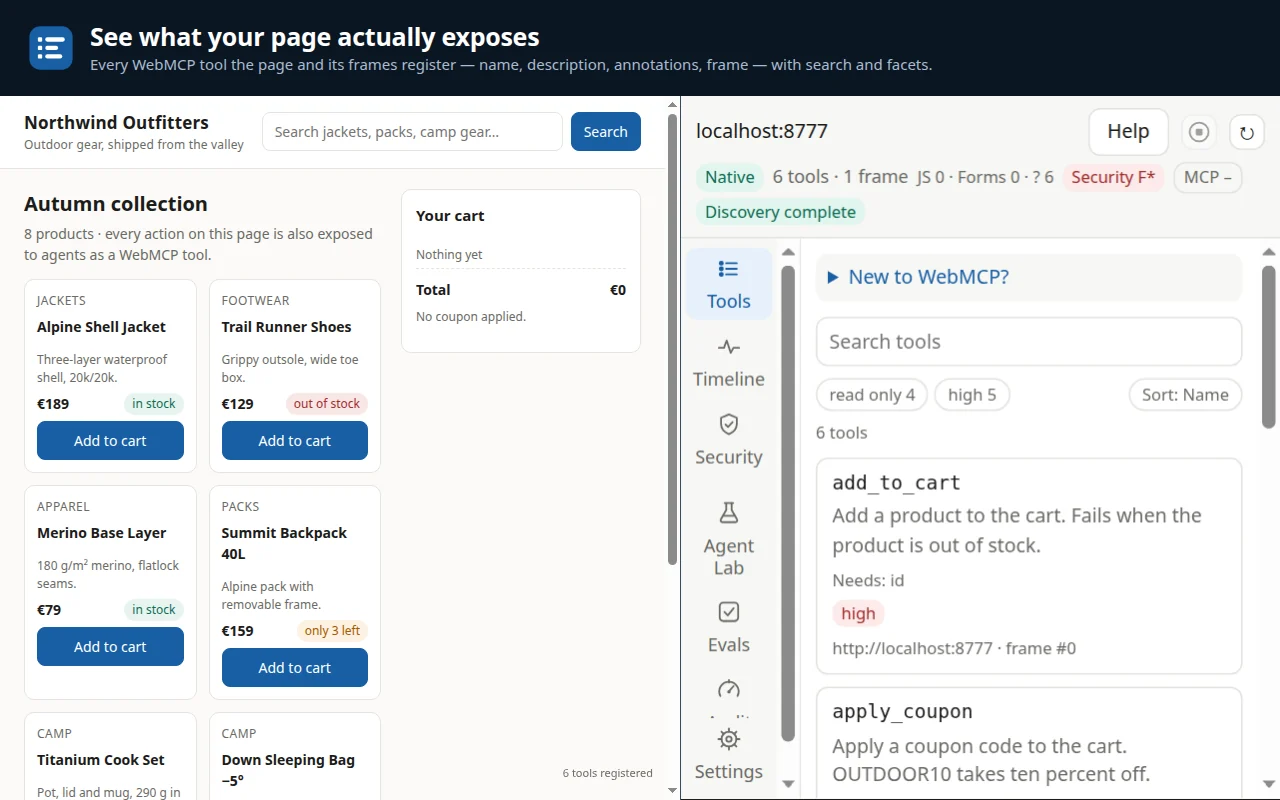
- Open Tools. Help includes a guide, a glossary and a bundled demo.
What you can do
A workbench for a page’s WebMCP tools.
- Inspect the page’s tools. Names, descriptions, input schemas, annotations and frame origins; registrations and removals; contract-quality findings in Audit; saved snapshots to compare. Explorer reports incomplete discovery and tells native tools, captured registrations, JavaScript emulation and declarative form inventories apart.
- Run tools and save reusable checks. Fill a generated form or enter JSON arguments, then inspect the result, timing, execution engine and dispatch status. Save argument sets, checks on selected JSON fields and manual recipes; pause, stop or cancel a run.
- Review security with evidence. Prompt-injection indicators, hidden or look-alike characters, consequential actions, inconsistent read-only claims, sensitive parameters, loose schemas and changed contracts, each finding with its evidence, severity, source and suggested remediation. A provisional 0–100 / A–F grade shows its calculation and unknown coverage; it is not a security certification.
- Check sites you control. For a site you declare you control, run bounded active probes, save a security baseline and, on request, check discovery-file conventions and CSP, CORS and Permissions-Policy headers.
- Connect a local MCP client (optional). The zero-dependency Node.js companion connects a trusted local MCP client through authenticated IPv4 loopback; Corsen Guard shows the exact tool, origin and arguments for your approval.
- Export tests and reports. JSON or Markdown, reviewed Playwright TypeScript tests from recorded calls and recipes, and security findings as Markdown or SARIF 2.1.0.
- Use your own AI provider (optional). A supported cloud provider with your own key, or a compatible local model server. No provider is selected automatically, and Explorer names the destination before a run.
What it does not do
What it does not do.
- Installs without site access and asks for one origin at a time; no all-sites grant is requested.
- Passive review invokes no tool and sends no network request.
- No activity-collection backend, advertising or telemetry.
- API keys stay in browser-session memory by default. The optional passphrase-protected AES-GCM vault keeps only ciphertext on this device, and configuration exports exclude keys.
- Quick-Fix generates a template for you to review and copy, never an automatic patch.
- When a call’s effects are unknown, Explorer stops automatic continuation and does not replay that action. It cannot guarantee what a website’s own callback does internally.
Permissions
Every permission, and why.
Chrome shows its own wording when it asks; here is what this extension does with each permission, from its store listing.
| Permission | What it is used for | When |
|---|---|---|
sidePanel | Displays the workbench beside the page you inspect: tool inventory, manual runs, recipes, security review, Agent Lab and local MCP approvals. | At install |
storage | Keeps settings and saved work on this device: history, checks, recipes, snapshots, conversations and security baselines. API keys are session-only by default; the optional vault stores ciphertext. No sync. | At install |
scripting | Reads the page’s WebMCP API, inventories declared tool forms and invokes the tools you select in their registered frames, only on sites you allowed. Instrumentation and JavaScript emulation are off by default. | At install; acts only on allowed sites |
activeTab | Lets the toolbar button identify the current page so Explorer can name the site before asking for access. It does not collect browsing history. | At install |
alarms | Runs the optional passive re-check of a security baseline on already-open allowed tabs. It never opens pages, invokes tools or sends network probes. | At install; the re-check is off by default |
Host access (optional) | Requested one origin at a time, for a site you choose to inspect or an AI endpoint you configure. Revoking access removes future instrumentation and invalidates local MCP tab bindings. | When you allow a site |
Data it handles
Where your data goes.
The store listing declares what Explorer handles for its features: authentication information (provider keys, the optional vault, session pairing), personal communications (your chats with a model you configured), web history (the allowed page’s address), user activity (the tool calls you request) and website content (tool contracts and requested results).
AI requests go only to the provider you configured, after Explorer names the destination and what will be shared. A paired local MCP client receives the tool data you explicitly share and handles it under its own settings. Nothing goes to Corsen AI.
Version
WebMCP Explorer 2.3.0-rc1
Version 2.3.0 has been on the Chrome Web Store since 5 November 2026; the store displays it as 2.3.0-rc1. It added the optional encrypted key vault, security indicators and grade, the guarded local MCP bridge and Playwright and SARIF exports. Qualified on Chrome 155 (Linux, macOS) and Chrome 157 (Windows ARM64).
Questions
Asked often.
Do I need WebMCP enabled in my browser?
For native calls, yes: native execution needs WebMCP support in both the browser and the page. Explorer’s diagnostics report the capabilities it observed. JavaScript emulation is available per allowed site, off by default; it does not replace native browser security or submit HTML forms.
Can I check a page without installing anything?
Yes. The public WebMCP Scanner inspects one public URL and produces a shareable report. Explorer goes further, on pages you open in your own browser.
Support and links