Universal AI Agent Connector
Unofficial community project by Corsen AI, not affiliated with or endorsed by the services and tools it works with. Using a chat service through its web page is subject to that service’s terms; you are responsible for how you use your accounts.
Universal AI Agent Connector links the Chrome tabs you choose to the AI agents running on your own computer, through a small open-source companion app. Nothing goes through Corsen AI.
Free · Version 0.1.0 · Chrome 125+ · English and French
Before you install
What you need, then 5 steps.
- Chrome 125 or later.
- Node.js 22 or newer and pnpm, to run the companion from its repository.
- The AI agents or tools you want to connect, on the same computer.
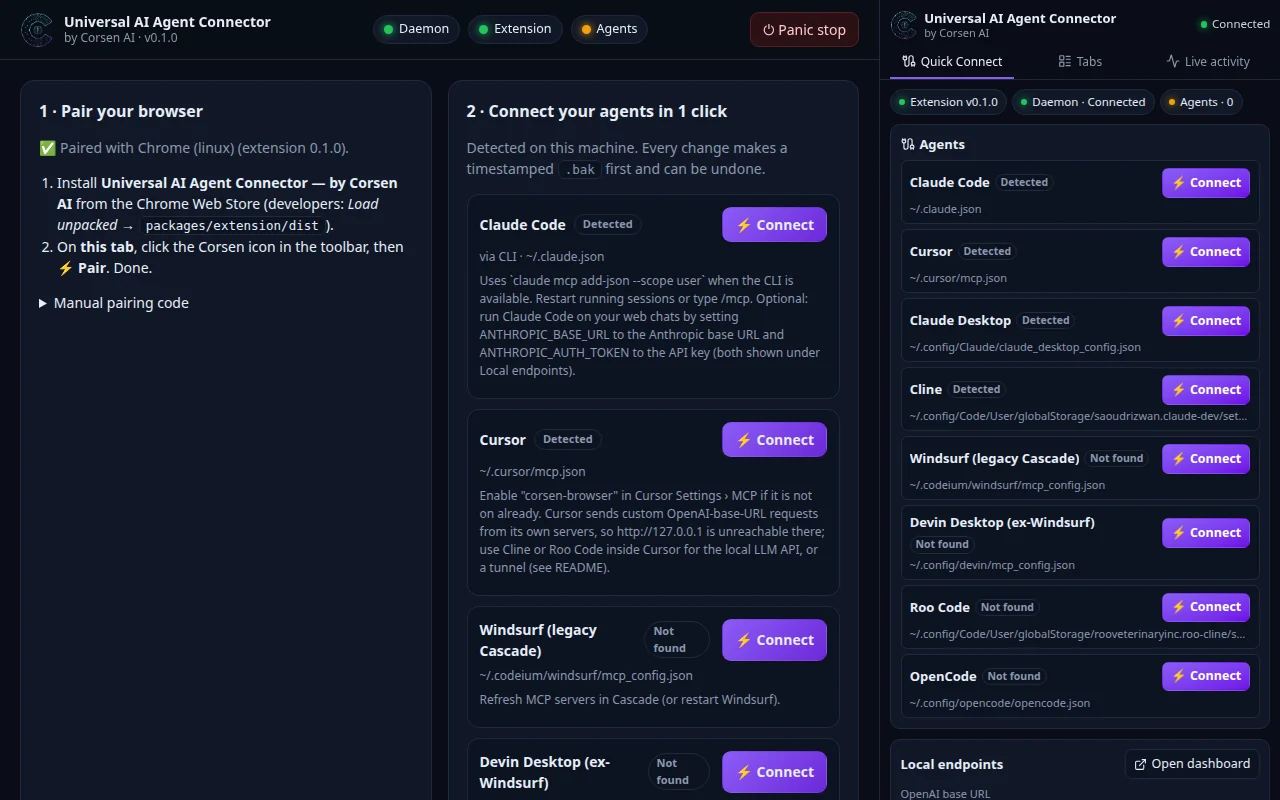
- Install the extension, Universal AI Agent Connector — by Corsen AI, from the Chrome Web Store. Developers can also load
packages/extension/distunpacked afterpnpm build. - Run the companion from its repository:
It starts ongit clone https://github.com/CorsenAI/universal-ai-agent-chrome-connector.git cd universal-ai-agent-chrome-connector pnpm install && pnpm build pnpm connector127.0.0.1:43110and opens its local dashboard. - Pair. On the dashboard tab, click the Corsen icon in the toolbar, then Pair. The pairing survives restarts.
- Connect your agents from the dashboard, the side panel, or
pnpm connector setup. Every change makes a timestamped.bakfirst and can be undone. - Give a tab a role. Open a page, click the Corsen icon and choose MCP; open a signed-in chat and choose LLM.
What you can do
Two roles per tab, chosen by you.
- MCP role. Your agents read the page as clean Markdown or as an accessibility tree with short element handles; click, type, select, scroll and navigate with real browser input; see console errors and failed requests; read the page’s own JSON and GraphQL calls; and take a screenshot.
- LLM role. A chat site you are signed in to answers the requests of tools on your computer through local OpenAI- and Anthropic-compatible endpoints: each prompt is typed into the page and the answer read back as text, one request at a time.
- One-click setup. The companion detects the MCP clients installed on your computer (Claude Code, Cursor, Claude Desktop, Cline, Roo Code, OpenCode, Windsurf legacy Cascade and Devin Desktop) and writes their configuration for you, after a timestamped backup, with Unlink and Restore.
- Panic stop. One click detaches the extension from every page.
What it does not do
Private by default, visible, reversible.
- Every tab starts as Ignored: private, never read, never touched. Roles change only from your own interface, never by an agent; a request without the matching role fails, with no fallback to another tab.
- Chrome shows its “started debugging this browser” bar while a tab is controlled; cancel it and the tab is private again.
- Passwords, one-time codes, card fields, hidden inputs, secret address parameters and credential headers are masked in the browser before anything leaves it. Screenshots are pixels and are not masked.
- The extension talks only to the companion on 127.0.0.1, after a mutual HMAC pairing. No analytics, no telemetry, no remote code; there is no Corsen server.
- Cookies, history, bookmarks and saved passwords are not read; those permissions are not requested.
Permissions
Every permission, and why.
Chrome shows its own wording when it asks; here is what this extension does with each permission, from its store listing.
| Permission | What it is used for | When |
|---|---|---|
debugger | Reads and acts in the tabs you give a role, through the Chrome DevTools Protocol: trusted clicks and typing, page text and accessibility tree, console and network errors, the page’s JSON and GraphQL calls, screenshots. Attaches only to a tab with a role, only when a request needs it. Chrome does not allow it to be optional. | At install; used on tabs with a role |
tabs | Lists open tabs (title and address) in the side panel so you can choose which ones get a role, and recognizes supported chat sites. Only tabs with a role are reported to the companion. | At install |
sidePanel | The main interface: connection status, one-click agent setup, tab roles, the live activity feed and Panic stop. | At install |
storage | Keeps the pairing code, a random installation identifier, the companion’s port and the chat selectors you calibrated. Tab roles live in session storage, so a browser restart makes every tab private again. No page content is stored. | At install |
activeTab, scripting | One-click pairing: when you click the toolbar button on the companion’s dashboard tab, the popup reads the pairing code that page displays, once. | On your click |
alarms | Wakes the service worker every 30 seconds to reconnect to the local companion when it was not running, so agents’ requests are not lost. | At install |
Not requested: host permissions or <all_urls>, content scripts, cookies, webRequest, declarativeNetRequest, nativeMessaging, history, bookmarks, downloads, clipboard read.
Data it handles
Where your data goes.
For tabs you gave the MCP role, when an agent asks: page text, accessibility tree, title, address, screenshots, console and network errors and the page’s own JSON and GraphQL calls. For chat tabs with the LLM role: the prompts typed into the page and the answers read from it.
It goes from the tab to the extension, to the companion on 127.0.0.1, to the agent or tool on your computer that asked. Those agents may send tool results to their model provider under their own configuration; a chat site receives the prompts typed into it under your account. Nothing reaches Corsen AI.
Version
Universal AI Agent Connector 0.1.0
Version 0.1.0, released on GitHub on 9 November 2026 with the extension ZIP and its SHA-256. The companion runs from the repository at the same version.
Questions
Asked often.
Can Cursor use the local LLM endpoint?
Cursor sends custom-model requests from its own servers, so 127.0.0.1 is unreachable from there. Use Cline or Roo Code inside Cursor, or a tunnel started with --allow-host (the API key stays required). The MCP role works with Cursor directly.
Which chat sites work in the LLM role?
Built-in support covers DeepSeek, Claude.ai, ChatGPT, Gemini, Qwen and Kimi, and any other chat you calibrate in the Tab Manager by clicking its input, its send button and one answer. Chat interfaces change; if a site stops answering, calibrate it again.
Support and links