
Hermes Connector
Unofficial community extension by Corsen AI. Not affiliated with or endorsed by Nous Research or Google.
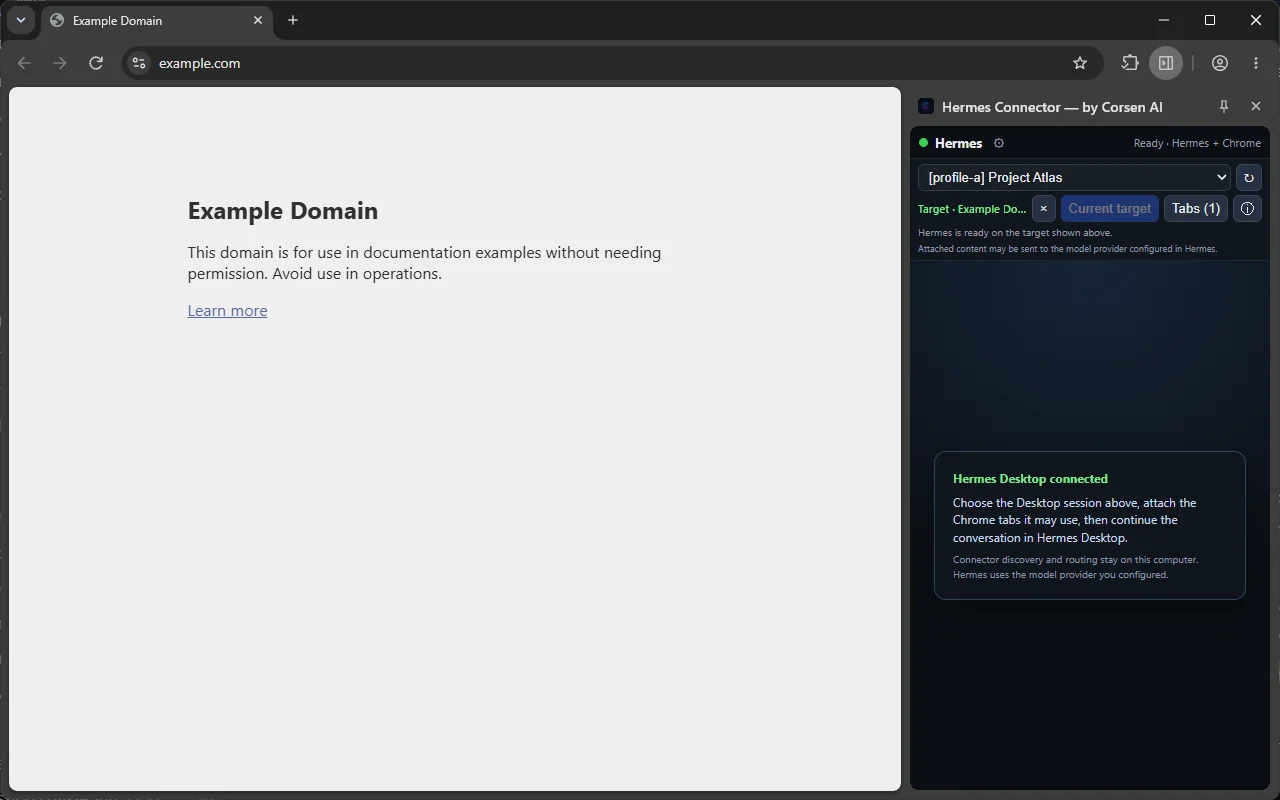
Connect Hermes Agent to the Chrome tabs you choose. Hermes Connector is a local browser automation bridge for Hermes Agent: it works with Hermes Desktop or the Hermes CLI through a local companion, and routes each selected Hermes session only to the tabs you explicitly attach.
Free · Version 0.2.6 · Updated 22 Oct 2026 · 1,000 users · 5.0 from 7 ratings · Chrome 120+
Before you install
What you need, then 3 steps.
- A local Hermes Agent installation: Hermes Desktop or the Hermes CLI.
- The Hermes Connector companion, at the same version as the extension.
- Chrome 120 or later on a desktop system.
- Install the extension from the Chrome Web Store, then pin it so the side panel is one click away.
- Install the companion with the version
chrome://extensionsshows for Hermes Connector: 0.2.6 today. Windows: double-click Install Hermes Connector.cmd (or run.\install.ps1). macOS and Linux: run./install.sh. Then fully quit and restart Hermes Desktop, dashboards, gateways and chats. - Pair, select, attach. Enter the pairing code the installer prints into the side panel, pick a Hermes profile and session, and attach only the tabs it may control.
What you can do
Your Hermes sessions, in the tabs you choose.
- Choose a real local Hermes profile and session, then attach one or more Chrome tabs to that exact session.
- Let Hermes navigate, inspect, read, click, type, scroll, hover, select, drag, use keyboard shortcuts, take screenshots, search the page and use browser history.
- Open, list, switch and close tabs only within the selected session’s scope.
- Run several Hermes projects at the same time without crossing their tabs.
- Work in your normal signed-in Chrome profile and existing website sessions, without a hidden automation profile.
- Keep Hermes Desktop in its own app, or embed your local Hermes Web dashboard in the side panel.
What it does not do
Local by design.
- No Corsen AI relay, cloud account, analytics, advertising, tracking or telemetry. The extension talks to the companion on 127.0.0.1.
- A tab is not exposed to Hermes until you attach it. Bindings are explicit, isolated and revocable; if a tab moves to another Hermes session or Chrome profile, the previous owner is revoked.
- Browser actions are refused when a session has no attached target.
- No remote control code is downloaded or evaluated. Incoming messages select only from a fixed set of actions bundled with the extension.
- The pairing secret uses mutual authentication and is never sent over the connection.
- Website cookies and login storage are not read. Passwords, one-time codes and payment fields are redacted from accessibility snapshots; visible page text and screenshots can still contain sensitive information, so attach only tabs you are comfortable sharing with your Hermes configuration.
Permissions
Every permission, and why.
Chrome shows its own wording when it asks; here is what this extension does with each permission, from its store listing.
| Permission | What it is used for | When |
|---|---|---|
<all_urls> | You can attach a tab from any web origin. Broad host access is needed to inspect and act on those pages and for the visible-tab screenshots you request. Tabs are not exposed to Hermes until you attach them. | At install |
scripting | Runs packaged, fixed helper functions in attached tabs to build accessibility snapshots and perform the clicks, typing, scrolling and selection you request. No fetched code is injected. | At install |
storage | Keeps a random local browser identity, loopback settings, the local pairing credential and the exact session-to-tab bindings on this device. | At install |
sidePanel | Shows the connector controls and session status, or your local Hermes Web dashboard, beside the page. | At install |
alarms | Keeps the authenticated local WebSocket available during an active Hermes task when the service worker would otherwise suspend. | At install |
debugger | Chrome does not allow this permission to be optional. It is used only if you turn on Trusted input, for reliable input events and page dialogs in the selected attached tab; Chrome shows its debugging banner while attached. | Used only with Trusted input, off by default |
Data it handles
Where your data goes.
To automate the browser, the extension handles visible website content, the screenshots you request, and the URLs and titles of the tabs you attach. Opening the Tabs list shows current tab titles and URLs locally so you can choose. This data goes to your local Hermes installation, not to Corsen AI.
Two kinds of authentication information stay local: the Connector pairing credential, of which only HMAC proofs travel to the companion; and, in Web-dashboard mode only, an ephemeral Hermes session token kept in memory and returned only to the same loopback Hermes API. Neither reaches Corsen AI.
If you configured Hermes with a remote AI model provider, Hermes may send relevant content to that provider under your configuration and that provider’s terms.
Version
Hermes Connector 0.2.6
Extension 0.2.6 pairs with companion 0.2.6 (protocol 5, port 8767). Chrome updates the extension by itself; the companion does not update itself. Install the companion with the same number, then fully restart Hermes. The update notice and the toolbar badge stay until the versions match. Older pairs are listed on the companion page.
Questions
Asked often.
Do I need the Hermes Web dashboard?
No. Since 0.2.6 the session list comes from the companion over the authenticated loopback connection, so the side panel works with Hermes Desktop or the CLI. The embedded dashboard remains available when you run hermes dashboard.
Why does Chrome show “started debugging this browser”?
Only when you turned on Trusted input. The debugger transport is then used for reliable input events and page dialogs in the attached tab. Trusted input is off by default.
The side panel says the companion is offline after an update.
Chrome updated the extension and the companion did not follow. Check the version in chrome://extensions, install the companion with the same number, fully restart Hermes, then enter the pairing code the installer prints.
Will the companion block Hermes updates on Windows?
No. Companion 0.2.6 keeps its detached broker outside Hermes’ managed virtual-environment launcher, so later Hermes Desktop or CLI updates are not blocked.
Support and links